Your pet, not a character pack
How to Turn a Pet Photo Into a Desktop Pet
Turn a photo of your dog, cat, or another pet into a custom desktop companion. The goal is to preserve enough of your pet’s face, coloring, shape, and personality that the animal on screen feels familiar.
From pet photo to desktop companion
Likeness first. Motion second.
WHAT YOU NEED
Start with one clear photo that shows what makes your pet recognizable.
Choose one clear pet photo, use it as the visual reference for the animated actions, review the result, then pair the finished pet with a transparent desktop app. DeskBub handles that workflow for Windows and Mac, while Kaka lets you try the desktop experience free first.
A real example
Kaka, from photo to desktop pet
Kaka is a real dog. His photo shows the face, coloring, and shape we wanted to keep recognizable in the animated pet. Results depend on the source photo and the action you choose.
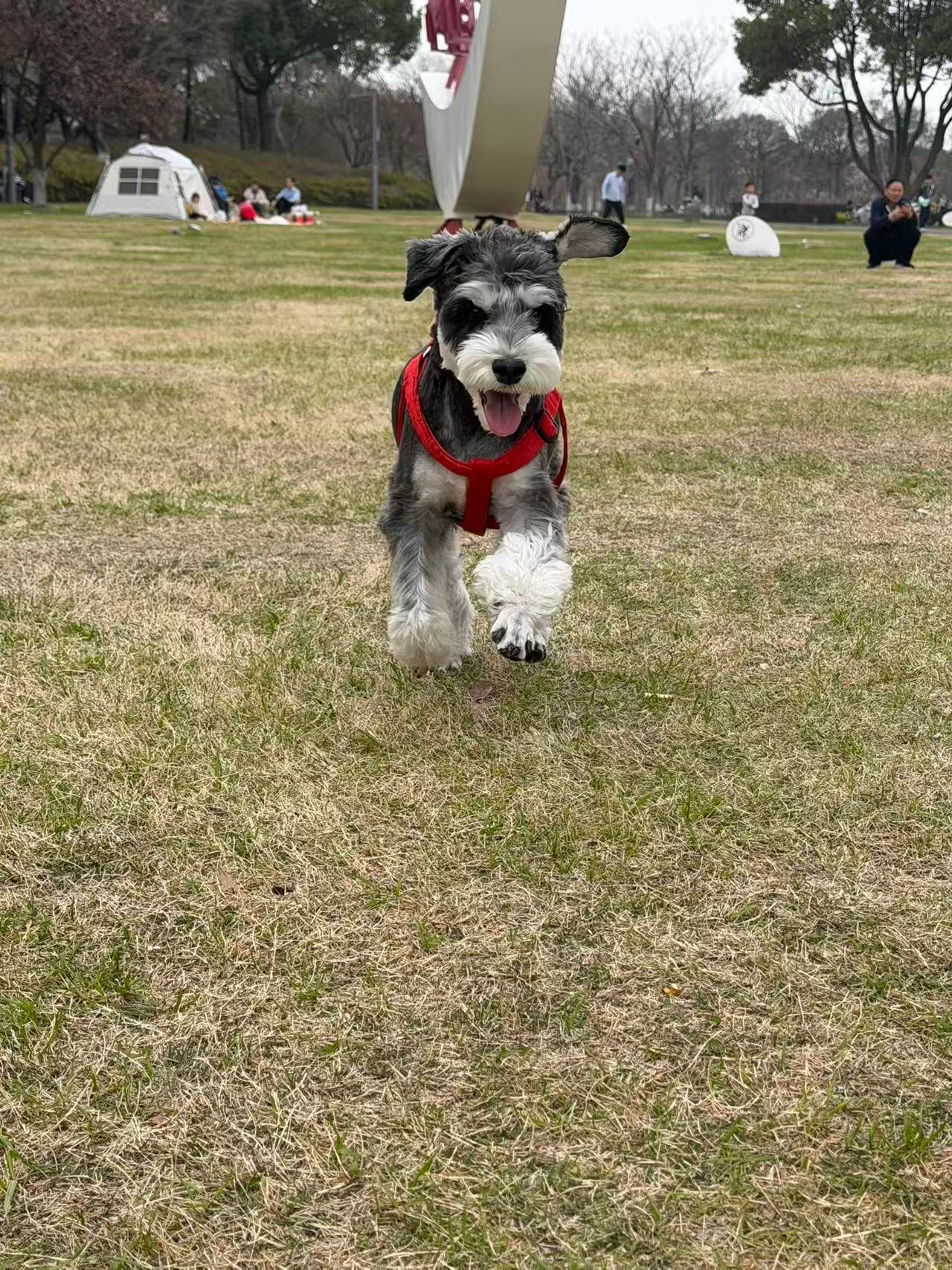
First, decide what “desktop pet” means to you
Some desktop pets are ready-made pixel characters. Others are engines that expect you to supply drawings and animation frames. A pet-photo service solves a different problem: you have a real animal and want a recognizable version of that animal to stay above your everyday apps.
That distinction changes the workflow. Instead of browsing character packs, you begin with identity: the markings around the eyes, ear shape, tail, body proportions, and colors that make your pet easy to recognize.
| Starting point | Best fit | Typical result |
|---|---|---|
| Ready-made character | You want something cute immediately | A generic mascot or fictional character |
| Sprite or pet engine | You already draw or animate | A pet built from assets you prepare |
| Real pet photo | You want your own animal on screen | A personalized animated desktop companion |
Choose one photo that makes your pet easy to recognize
A useful source photo is clear, well lit, and centered on one animal. The face should be visible, and the body outline should not disappear behind furniture, blankets, hands, or another pet.
A simple phone photo can work. Professional photography is not required. What matters more is whether the image clearly shows the features you would use to identify your pet at a glance.
- ✓Use even lighting so dark and light markings remain visible.
- ✓Keep the face, ears, legs, and tail in frame when possible.
- ✓Avoid heavy filters, stickers, text, and motion blur.
- ✓Choose one pet per image instead of asking the system to guess.
Turn the visual reference into movement
The source photo establishes appearance; the animation adds behavior. A finished desktop pet needs transparent frames or video, clean edges, consistent scale, and motion that does not make the pet change identity between frames.
Review the face, coat pattern, silhouette, and motion together. A technically smooth animation is not enough if the pet no longer looks familiar. If the likeness is weak, a clearer source photo is usually more useful than repeatedly accepting a poor reference.
Upload
Start with one clear photo and identify the animal type.
Generate
Create a transparent animated action using the photo as the identity reference.
Review
Check likeness, outline, motion, and whether important markings survived.
Pair
Open the desktop app and pair the approved pet with Windows or Mac.
Know what the result can—and cannot—preserve
A custom desktop pet is an animated interpretation, not a live camera feed or an exact reconstruction of every strand of fur. A strong result preserves the features that matter most while remaining readable at desktop size.
Different poses may require the system to infer parts of the body that are hidden in the photo. Unusual markings, clothing, long fur, cropped paws, and complex backgrounds can make that inference harder. Honest expectations produce better photo choices and better decisions.
Try the desktop experience free before making your own
Kaka is the real dog behind DeskBub. He is included at no cost so you can see how a pet floats above apps, moves around the screen, and fits into a normal workday before paying for custom generation.
If the experience feels right, the custom path starts with your own photo. Free Kaka and paid customization are separate: trying Kaka does not make custom pet generation free.
Two clear paths
Try a free desktop pet—or make one from your pet photo.
Kaka is free with no account or payment. Custom pets start at $2.99 as a one-time purchase.
Frequently asked questions
Can I make a desktop pet from one photo?
Yes. DeskBub starts from one clear pet photo. A visible face, clean body outline, and good lighting give the system a better identity reference.
Can I use a dog, cat, rabbit, or bird photo?
Yes. DeskBub is designed for dogs, cats, rabbits, birds, and other clearly visible pets rather than a fixed library of generic characters.
Is a custom desktop pet free?
Kaka is included free with no account or payment. Creating a pet from your own photo is a separate one-time purchase starting at $2.99.